
Archive and backup
After a ransomware attack one question matters: how long until the company is running again? The answer depends not on the backup but on the recovery. We design and implement backup and archiving that we actually test, regularly.
What you get
- A backup and recovery plan: what to back up, how often, where, and how fast you must recover.
- Immutable backups that attackers can neither delete nor encrypt.
- Compliant archiving for Exchange, SharePoint, Teams and file servers, with retention rules and full-text search.
- Recovery tests: evidence that the plan works – which DORA and auditors ask for.
Who needs it most
- Financial sector: DORA sets strict data retention and recovery requirements.
- Companies under NIS2: the law also checks business continuity and recovery capability.
- Any company where one day of downtime costs more than a year of backup. Our calculator shows how much from a few figures.

The technology we work with
| Solution | What it is for |
|---|---|
| Arcserve | Unified backup and disaster recovery for on-premises, cloud and SaaS, with immutable storage |
| Cohesity | Backup and data management on one platform, with AI to detect anomalies and attacks |
| TECH-ARROW contentACCESS | Compliant archiving for Microsoft 365 and file servers, with GDPR-compatible retention |
We choose the product to fit your environment, not the other way round.
Backup or archive?
The video is provided by YouTube (Google). When played, Google receives data from your browser.
Frequently asked questions
What is the difference between backup and archiving?
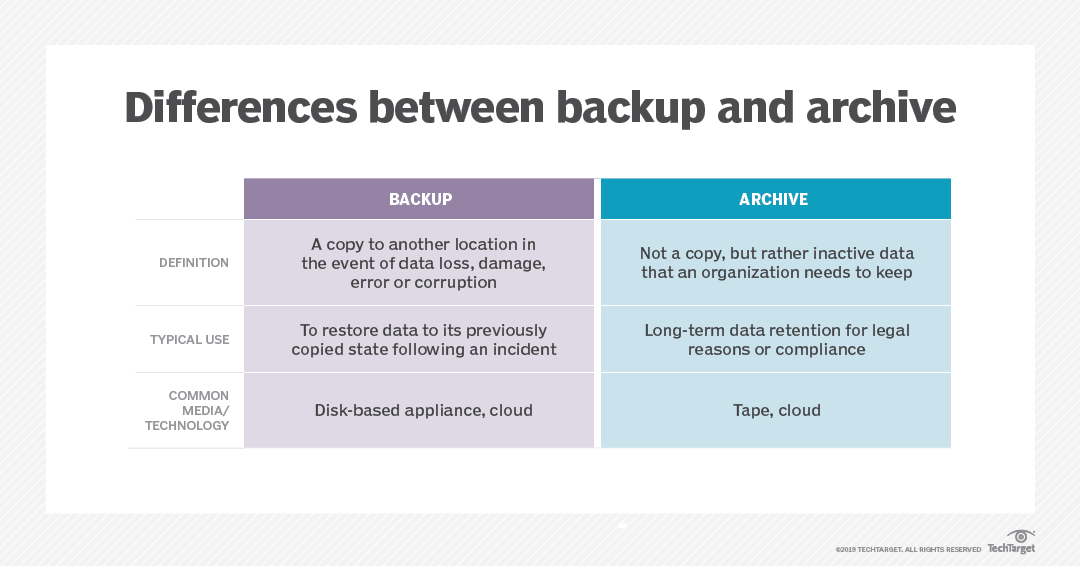
A backup is a copy for when something goes wrong: its purpose is fast recovery. Archiving is the compliant storage of old data you must keep: its purpose is compliance and retrieval.
We already have backups. Why would we need more?
Because attackers look for the backups first. If a backup can be deleted or has never been tested, the security is only apparent.
Let’s talk about where your company stands today.
Book a consultation
